

Download Research Studio – AI‑Powered Data Analysis Tool
Research Studio, developed by Black Device Srl, is a free, AI‑driven data analysis tool that turns raw market research and survey data into clear, actionable insights. Designed for marketing professionals, product developers, and UX designers, the platform leverages deep machine‑learning algorithms to automatically summarize large data sets, generate visual diagrams, and answer specific research questions via an integrated AI chat. While the free tier lets users process up to two research projects per month (with a three‑file, 5 MB limit per project), a monthly premium subscription unlocks advanced visualizations, unlimited research uploads, AI‑enhanced general knowledge queries, and export options. In a world where data volumes are exploding, Research Studio promises to cut analysis time dramatically, allowing teams to focus on strategy and execution rather than manual number‑crunching. Its intuitive web‑based interface, secure cloud processing, and regular updates make it a compelling addition to any data‑centric workflow, whether you’re launching a new product, refining a marketing campaign, or simply trying to understand customer sentiment.
Key Features that Differentiate Research Studio
- AI‑Generated Summaries: Instantly converts raw survey files into concise, human‑readable summaries that highlight key trends and outliers.
- Interactive AI Chat: Ask follow‑up questions in natural language to dig deeper into the data without needing advanced statistical knowledge.
- Visual Diagram Builder (Premium): Create bar charts, heat maps, and trend lines that can be embedded directly into reports or presentations.
- General Knowledge Engine (Premium): Access a broader AI knowledge base for contextual insights, such as industry benchmarks or competitor analysis.
- Export Options (Premium): Download full reports in PDF, CSV, or PowerPoint formats for offline review or stakeholder distribution.
- Secure Cloud Processing: All uploads are encrypted in transit and at rest, complying with GDPR and other major privacy standards.
- Multi‑File Support: Upload up to three files per research project, allowing you to combine survey results, interview transcripts, and raw data tables.
- Regular Model Updates: The underlying AI engine is continuously refined, ensuring the latest natural‑language processing techniques are applied to your data.
Installation & Usage Guide – From Download to Insight
Getting started with Research Studio is intentionally straightforward. Because the platform is web‑based, there is no traditional “installation” process—simply visit the official website and create a free account using an email address or single‑sign‑on via Google or Microsoft. After verification, you’ll land on the dashboard where the “New Research” button invites you to upload your first data set.
Step‑by‑step workflow:
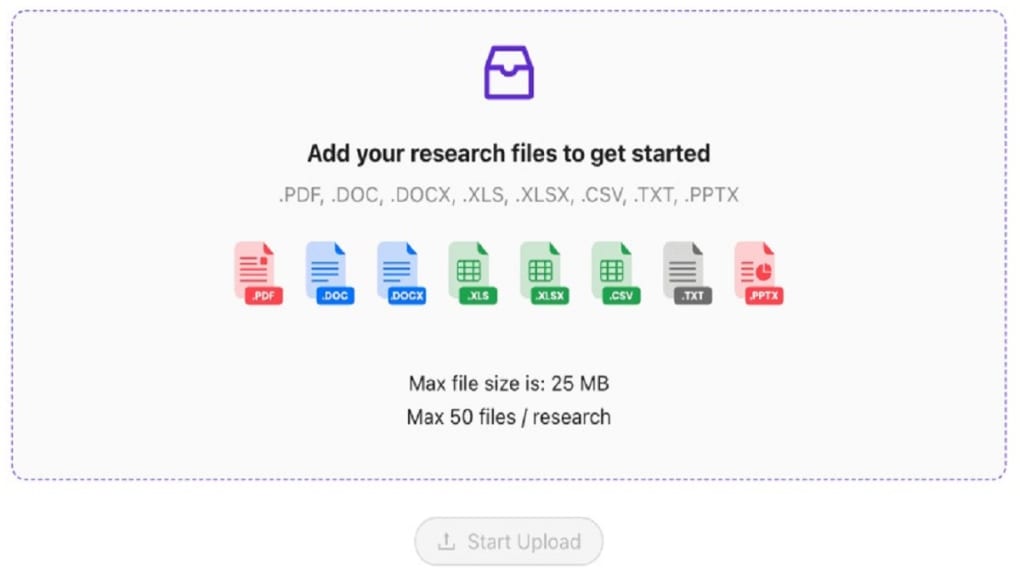
- Upload Files: Drag and drop up to three files (CSV, Excel, or plain‑text) into the upload area. The free tier enforces a 5 MB per‑file limit, which is ample for most survey exports.
- Select Analysis Mode: Choose “Quick Summary” for an instant overview, or “Deep Dive” if you plan to ask follow‑up questions via the AI chat.
- Review AI Summary: Within seconds, the platform presents a bullet‑point summary, highlighting dominant responses, sentiment scores, and notable patterns.
- Interact with the AI: Type natural‑language queries such as “What were the top three reasons respondents chose option A?” The AI parses the original data and returns precise answers, complete with supporting excerpts.
- Generate Visuals (Premium): Click “Create Diagram” to select chart types, adjust axes, and customize colors. The resulting graphics can be saved directly to your account or exported.
- Export or Share: When you’re satisfied, use the “Export Report” button to download a polished PDF or share a secure link with teammates.
The platform’s UI is responsive, meaning you can conduct the entire workflow on a desktop, tablet, or even a smartphone. For power users, a built‑in “History” tab logs all past research projects, allowing you to revisit previous analyses, compare trends over time, and re‑run queries with updated data sets.
Platform Compatibility – Where Research Studio Runs
Research Studio is a cloud‑native SaaS application, which makes it inherently cross‑platform. As long as you have a modern web browser (Chrome, Firefox, Edge, or Safari) and an internet connection, you can access the full feature set from virtually any device. Below is a quick compatibility matrix:
- Windows 10/11: Full functionality via Chrome, Edge, or Firefox.
- macOS Monterey and later: Seamless experience in Safari, Chrome, or Firefox.
- Linux distributions (Ubuntu, Fedora, etc.): Supported through Chrome or Firefox.
- iOS 14+ (iPhone & iPad): Mobile‑optimized web app; AI chat and summary views work flawlessly.
- Android 9+: Access via Chrome or the native Android browser; all core features are available.
- Chromebooks: Fully compatible, with the same speed and UI responsiveness as on desktop browsers.
Because the heavy lifting (AI inference and data processing) occurs on secure backend servers, device performance has minimal impact on analysis speed. Users on lower‑spec devices will still experience rapid summaries, though rendering complex visual diagrams may be slightly slower on older hardware. Regular updates are deployed server‑side, so you always benefit from the latest AI improvements without needing to download patches or reinstall the application.
Pros & Cons – A Balanced Look at Research Studio
Pros
- Free tier provides a generous entry point for small teams or individual researchers.
- AI‑generated summaries cut analysis time by up to 80 % compared with manual spreadsheet work.
- Natural‑language chat interface eliminates the need for statistical expertise.
- Secure, GDPR‑compliant cloud storage ensures data privacy.
- Cross‑platform accessibility via any modern web browser.
- Premium visual diagram builder adds professional polish to reports.
- Regular AI model updates keep the tool on the cutting edge of NLP.
Cons
- Free version limits users to two research projects per month, which may be restrictive for high‑volume analysts.
- File size cap of 5 MB per upload can be problematic for large raw datasets.
- Advanced visualizations and export options are locked behind a paid subscription.
- Occasional latency during peak usage times, as processing is cloud‑based.
- No native desktop app; offline analysis is not possible.
Frequently Asked Questions
Is Research Studio really free to use?
Yes, the core AI summarization and chat features are available at no cost. The free tier allows up to two research projects per month with a three‑file, 5 MB limit per project. Premium features such as unlimited projects, advanced visual diagrams, and export options require a monthly subscription.
What file formats can I upload?
Research Studio accepts CSV, Excel (.xlsx), and plain‑text (.txt) files. All files are processed securely in the cloud, and the platform automatically detects column headers and data types for optimal analysis.
Can I export my analysis for offline use?
Export functionality is part of the premium subscription. Paid users can download full reports in PDF, CSV, or PowerPoint format, making it easy to share insights with stakeholders who may not have access to the web app.
How secure is my data during processing?
All uploads are encrypted using TLS 1.3 during transmission and stored with AES‑256 encryption at rest. Black Device Srl complies with GDPR and ISO‑27001 standards, and no data is retained longer than necessary for analysis unless you choose to save it in your account.
Is there a mobile app for Research Studio?
Currently, Research Studio is a web‑only solution, but the responsive design works smoothly on iOS and Android browsers. The development team has indicated that a native mobile app may be released in the future based on user demand.
Conclusion – Should You Download Research Studio?
In an era where data overload can cripple decision‑making, Research Studio offers a refreshingly simple yet powerful way to turn raw survey responses into clear, actionable insights. The free tier is generous enough for occasional users, while the premium subscription scales gracefully for power users who need unlimited projects, advanced visualizations, and export capabilities. Its AI‑driven summarization and conversational query interface lower the barrier to sophisticated analysis, making it an excellent choice for marketers, product managers, and UX researchers alike.
If you’re looking for a secure, cross‑platform solution that can instantly distill complex data into digestible insights, give Research Studio a try. Sign up for the free account today, upload your first research file, and experience how AI can accelerate your workflow. For teams that need deeper reporting and visual storytelling, the modest monthly subscription unlocks a full suite of professional tools.
Ready to transform your data? Download Research Studio now and start generating insights in minutes.



.png)



